
How to Compress MOV Files

Compress MOV files quickly and effectively to free up space and speed up sharing — all while keeping your videos crisp and clear.
Whether you’re working on a massive project or just want to make sending clips easier, mastering this skill can save you time and hassle.
In this article, you’ll discover simple, powerful ways to shrink your MOV files without losing quality, so your footage stays stunning and ready to go wherever you need them.
Video Candy
Video Candy excels as an intuitive online MOV compressor with remarkable efficiency. It delivers rapid processing while maintaining visual clarity. Compatible across different devices and site explorers, it requires no software downloads, and its secure cloud infrastructure safeguards data during the entire procedure.
How to reduce video file size with Video Candy
- Visit the video downsizer website using any web client.
- Upload the clip by clicking the "Add Files" button.
- The tool will resize MOV file automatically.
- Download the optimized Quicktime visual to your device once the task is complete.
Pros:
- Designed for ease of use, making it a great video editor for beginners and professionals
- Optimized for work on iOS and Android through mobile browsers
Cons:
- Requires a stable internet connection
Flixier
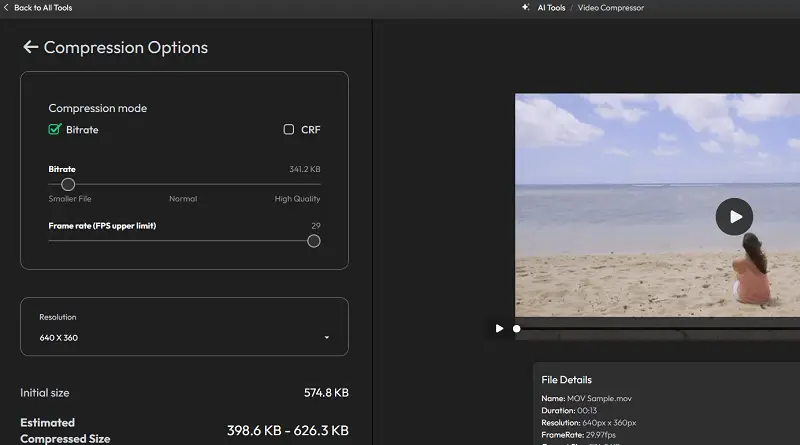
Flixier functions as a cloud-based video editing platform specializing in MOV compression through sophisticated encoding techniques. It provides various export options with adjustable settings, allowing fine-tuned optimization for different destinations such as social media, streaming services, or portable devices.
How to shrink video size with Flixier
- Open the webpage using your browser.
- Upload the file by pressing "Import" and choosing it from your device or connected storage.
- Modify the parameters with the available sliders.
- Start the compression by tapping the designated button to process the clip.
- After the task completes, save the reduced-size MOV.
Pros:
- Wide range of customizable options like resolution, bitrate, frame rate, and CRF
- Real-time collaboration capabilities for team projects
Cons:
- Compression of very large MOV files can be slower
- Advanced sliders can be tricky for beginners and may accidentally reduce video fidelity
VEED.IO
VEED.IO delivers an efficient video size reducer. It employs intelligent compression algorithms that automatically optimize clips, removing the need for technical adjustments. The platform allows downscaling and seamless format transformation during export, making it easy to tailor content for various devices or streaming requirements.
How to compress MOV file using VEED.IO
- Open your browser and go to compress video page.
- Click "Choose MOV File" to upload your footage from your PC.
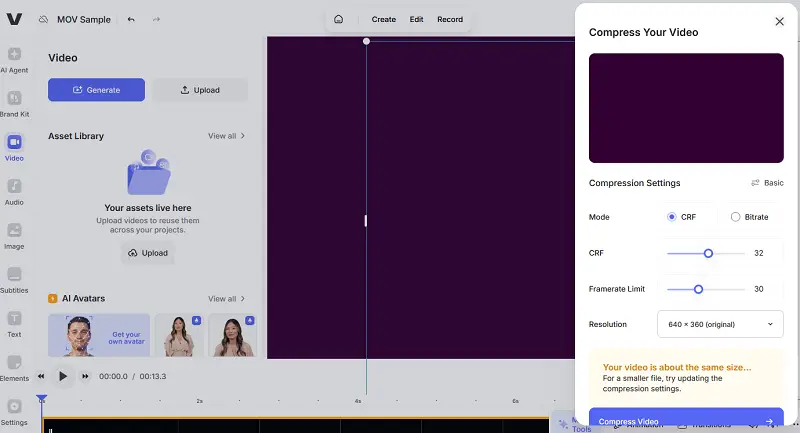
- Select the level level—low, medium, or high — based on your desired balance between file size and sharpness. A preview of the estimated output helps with your decision.
- For more detailed control, go to the advanced settings to modify controls like constant rate factor or frame limits.
- Hit "Compress Video" to begin the processing.
Pros:
- Supports a variety of formats beyond MOV, such as MP4 and AVI
- Allows direct sharing of visuals via link or social media
Cons:
- Some quality loss can occur, especially with higher compression parameters
Tips on how to compress MOV file
- Condense MOV file by adjusting the bitrate. Employ variable rates to preserve detail in complex scenes while minimizing storage in simpler ones.
- Re-encode using modern standards like H.264 or H.265 (HEVC), which offer superior compression ratios, particularly effective for high-definition footage.
- Decrease the pixel dimensions — for example, from 4K to 1080p or 720p — to eliminate unnecessary visual data and shrink file size.
- Drop the frame rate from 60 to 30 or even 24 fps to lessen processing demands without drastically affecting motion smoothness.
- Remove silent portions, black bars, or unused sections to shorten duration and eliminate excess content.
- Diminish audio fidelity by decreasing sample rate (e.g., 48kHz to 44.1kHz), or with compact formats like AAC.
- Increase spacing between intra-frames to reduce repetitive encoding, especially effective in static or low-motion sequences.
- Apply Constant Rate Factor mode to maintain perceptual quality while allowing flexible compression based on scene complexity.
- Relocate the moov atom to the beginning of the file to improve playback efficiency and online streaming performance.
FAQ: MOV compressor
- What is GOP structure, and how does it relate to how to compress video online?
- GOP (Group of Pictures) structure determines how frequently full frames appear. Extending intervals reduces redundancy, improving compression.
- Can I preserve alpha channel transparency?
- Yes, but you must utilize codecs that support alpha channels, such as ProRes 4444 or VP9. However, these tend to produce larger files; preserving transparency often limits how much compression can be applied.
- How can chroma subsampling affect MOV downsizing?
- Applying 4:2:0 chroma subsampling reduces color information, significantly lowering size. It’s suitable for streaming and general playback, though may slightly degrade tone precision.
- Why does the same setting yield different results for two MOVs?
- File size outcomes depend on source characteristics like motion intensity, resolution, bitrate, color complexity, and audio data. Even with identical settings, output vary based on input content.
- Can metadata removal reduce file size?
- Yes. Stripping unnecessary metadata such as embedded thumbnails, subtitles, or camera information can slightly decrease file size.
Conclusion
Successfully reducing the size of a MOV file demands striking the right balance between minimizing data and preserving audiovisual integrity.
Whether the goal is saving storage space, enhancing streaming speed, or simplifying file sharing, applying these MOV compressors ensures your clips remain both compact and visually appealing.

Expert Tech Writer
