5 Online vs 5 Desktop PDF Converters Comparison

In today’s fast-paced digital world, deciding between an online vs desktop PDF converter can have a big impact on how secure, efficient, and dependable your document organization is.
Cloud-based tools offer convenience, while local software provides more control over sensitive files. In this article, we’ll examine the differences in privacy, performance, and reliability, helping you select the solution that best suits your needs.
Online PDF converters overview
These services allow to process documents directly through a web browser. They remove the need for installation and are accessible from almost any device.
1. Security
Protecting critical content is paramount when using online PDF converters:
- Encryption: Leading platforms utilize AES-256 for transfers, combined with TLS/SSL protocols to prevent interception. Premium systems provide end-to-end safeguarding, ensuring assets remain confidential even from center operators.
- Retention Policies: Uploaded items are typically deleted automatically within hours, though enterprise solutions authorize configurable periods.
- Regulatory Compliance: Organizations managing regulated data (GDPR, HIPAA, ISO 27001) should verify that providers adhere to required standards, including audit trails and breach notification.
2. Processing Efficiency
Responsiveness depends on host capabilities, network quality, and file characteristics:
- Cloud Acceleration: Many utilities leverage concurrent execution, GPU support, and high-performance infrastructure.
- Framework Dependence: Upload and download times influence overall PDF conversion duration.
- Server Load: Costless or shared-tier accounts may experience reduced speed during peak demand.
- File Complexity: Papers containing multimedia, vector graphics, annotations, or custom fonts necessitate more resources to preserve formatting.
3. Integrity
Reliable web-based file conversion ensures that layout and content are maintained:
- OCR Accuracy: Scanned documents call for optical character recognition. Advanced OCR engines handle varied languages, font preservation, handwriting detection, and tables, while simpler modules may produce errors.
- Batch Operations: Free versions often limit simultaneous conversions, affecting sequence efficiency for bulk tasks.
- Intricate Schemes: Multi-column designs, tables, hyperlinks, and bookmarks may be altered or lost depending on the algorithm.
Additional Operational Considerations:
- Platform Compatibility: Web-based operation maintains Windows, macOS, Linux, iOS, and Android. Mobile-optimized interfaces allow paper handling on tablets and smartphones.
- Pricing & Access: Costless document converters include file size limits, watermarks, and daily quotas. Paid tiers offer higher execution limits, faster performance, progressive security, and enterprise-grade backing.
- Workflow Integration: Drag-and-drop interfaces, RESTful APIs, and connections with cloud storage services facilitate seamless automation.
- Maintenance: Providers manage upgrades, safeguarding patches, and feature enhancements automatically.
Best Online PDF converters: examples
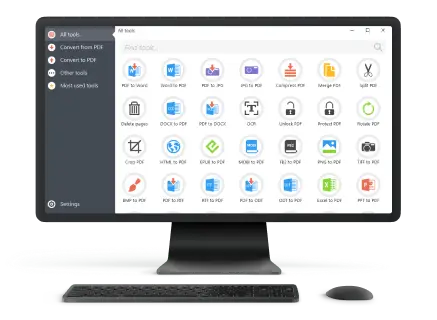
PDF Candy
The PDF file converter delivers one of the most comprehensive collections of utilities for document transformation. More than 40 distinct tools handle format reshaping, compression, watermark application, and script extraction.
Its layout is clean and straightforward, yet the functional depth rivals fully installed suites. A zero-fee option permits 1 task per hour, a limitation noticeable for heavy workloads.

Smallpdf
Highlights efficiency and dependable results. It enables rapid conversion between Word, Excel, PowerPoint, images, and PDFs, in addition to reduction, annotation, and electronic signing.
The complimentary plan fits light demands, whereas exclusive membership eliminates restrictions and enhances turnaround. Thanks to its simple design and worldwide popularity, it has become a mainstay among casual and professional audiences alike.

Adobe Acrobat Online
As the originator of the PDF format, it offers unmatched accuracy. Expanded features, when paired with Acrobat Pro, deliver merging, redaction, innovative password control, and document editing.
A trial window provides access to these enhanced abilities, making it highly attractive to specialists seeking precision and consistency.

FreePDFConvert
Handles not just office PDF conversions but also AutoCAD drawings. Extra utilities extend to PDF rotation, repair, splitting, shrinking, and selective removal.
Cluster workloads and unrestricted sizes are accepted, though certain specialized functions compel a premium plan. Its combination of range and discretion positions it as a practical choice for individuals and enterprises.

Zamzar
Change file to PDF directly via browser, through email, or by leveraging an automation API. The unpaid level allows two actions per hour up to 100 MB, while upgraded accounts provide greater capacity and faster turnaround.
With GDPR compliance and contractual safeguards, it appeals to entities maintaining strict confidentiality requirements.

Desktop PDF converters: overview
Locally installed programs operate independently of the internet, giving complete control over document handling and offering reliable performance for complex or private work.
1. File Protection
On-device operation enhances safety:
- Self-Hosted Processing: Items remain entirely on the machine, eliminating exposure to remote servers.
- Encryption Options: Users can apply strong algorithms to safeguard materials before sharing.
- Restrictions: Access may be limited through operating system credentials and permissions.
- Observance Management: Organizations maintain adherence to regulatory frameworks by keeping substance in-house.
2. Efficiency
Utilizing hardware resources ensures rapid execution:
- CPU & GPU: Multi-core processors and graphics acceleration enable quick transformation of intricate forms.
- Offline Capability: Conversions are independent of network speed.
- High-Capacity: Large or multimedia-rich reports can be turned without size limitations.
3. Accuracy
Internal applications maintain original formatting and structure when you convert to PDF:
- Superior OCR: Interpretation engines accommodate multiple scripts, table extraction, and handwritten annotations.
- Feature Fidelity: PDF forms, bookmarks, and hyperlinks are preserved with minimal alteration.
- Bulk Operations: Package editing or merging of numerous PDFs maintains quality uniformly.
Additional Factors:
- Licensing Models: Options include one-time purchase or subscriptions, typically without limitations.
- Software Integration: Works with office suites, accounting apps, and content management setups.
- Scalability: Performance scales according to available hardware, supporting resource-intensive projects.
Top desktop PDF converters: 5 options
PDF Candy Desktop for Windows
PDF Candy Desktop delivers a complete offline suite for document transformation. It integrates restructuring, batch rendering, enhanced optical text recognition, and utilities for splitting, joining, or shrinking files.
All activities take place locally, ensuring confidential material remains fully protected. The platform handles extensive initiatives efficiently, making it ideal for enterprises needing reliable data coordination.

Adobe Acrobat Pro DC
Acrobat Pro DC is the industry-leading application for revising and securing manuscripts. It allows modification of storyboard, images, and sheet layouts, while also integrating with office software.
Cutting-edge verification capabilities convert photocopied pages into editable formats. Built-in aspects include passwords, redaction features, and certificates, keeping sensitive elements safe.

ABBYY FineReader PDF
Excels at precision narrative capture. It reconstructs scanned documentation with exact formatting, ideal for archiving and digital repositories.
It also offers writing comparison, modification options, and protective measures. The meticulous approach appeals to legal, academic, and government professionals who need high fidelity and accuracy.

Soda PDF Desktop
Delivers user-friendly functionality with flexible viewing and amending modes. Conversion, PDF pages rearrangement, and compression are straightforward, while safeguards like encryption and permissions preserve integrity.
Lightweight and cost-effective, it suits independent professionals and small teams seeking effective PDF solutions.

Sejda PDF Desktop
Provides streamlined operations for document management. Stack optimizing, rapid PDF edits, section organization, and form handling are simplified for efficient workflow.
Its pay-as-you-go structure avoids long-term commitments, making it appealing for occasional or ad hoc projects requiring advanced capabilities.

Online vs desktop PDF converters: comparison table
| Aspect | Online PDF converter | Desktop PDF converter |
|---|---|---|
| Accessibility | Reachable from any browser | Requests installation |
| Internet Requirement | Must connect to network | Operates independently |
| Task Execution | Dependent on distant infrastructure | Uses machine resources |
| Privacy | Managed remotely with data protection | Stored securely on the machine |
| Document Volume | May restrict uploads | Handles large batches |
| Layout Preservation | Complex arrangements might shift | Retains original appearance |
| Multiple Item Operations | Often restricted in entry tiers | Processes groups efficiently |
| Extraction | Simple character detection | High-fidelity table and text capture |
| Integration | Compatible with storage services | Works with installed applications |
| Maintenance | Updates handled externally | User applies patches |
| Pricing | Subscription or trial offerings | Single purchase or licensed version |
| Scalability | Expands through offsite capacity | Limited by machine capability |
| Customization | Minimal interface modifications | Extensive configuration choices |
| Work Without Connection | Not functional offline | Fully operational independently |
| Standards Adherence | External architecture may ensure conformity | Managed internally |
| Assistance | Web-based help or chat support | Manuals, tutorials, or direct aid |
| Stability | Fluctuates depending on traffic | Consistent, self-contained |
| Energy Deployment | Light on local resources | Uses processing units |
| Reliability | Hooked on uptime of virtual system | Predictable and steady |
| Learning Curve | Beginner-friendly | May necessitate practice to master |
Conclusion
Choosing between online and desktop PDF converters depends on your specific needs.
Evaluating speed, security, functionality, and efficiency ensures the selected solution delivers a seamless and secure document management experience.
Expert Tech Writer