
Professional Video Editors to Use in 2026

Professional video editing software is the driving force behind every stunning movie, viral clip, and captivating commercial you encounter today.
Whether you’re an experienced filmmaker or just starting out, the right applications can transform raw material into a polished masterpiece.
In this article, we’ll explore some of the most powerful editing programs available, revealing features that help you craft videos that truly engage and inspire.
Option 1. Icecream Video Editor
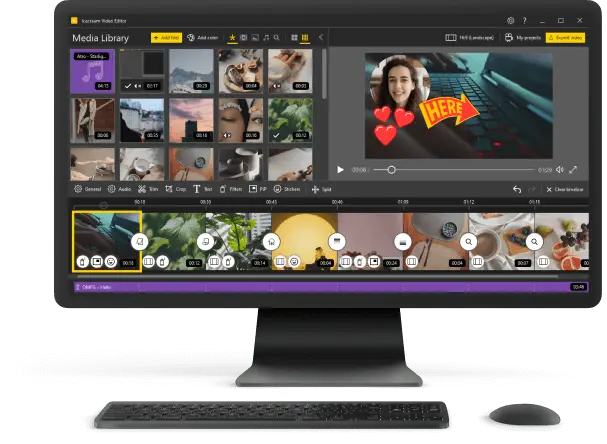
Icecream Video Editor offers a minimalist approach to professional modifications, focusing on clarity and ease without sacrificing essential capabilities.
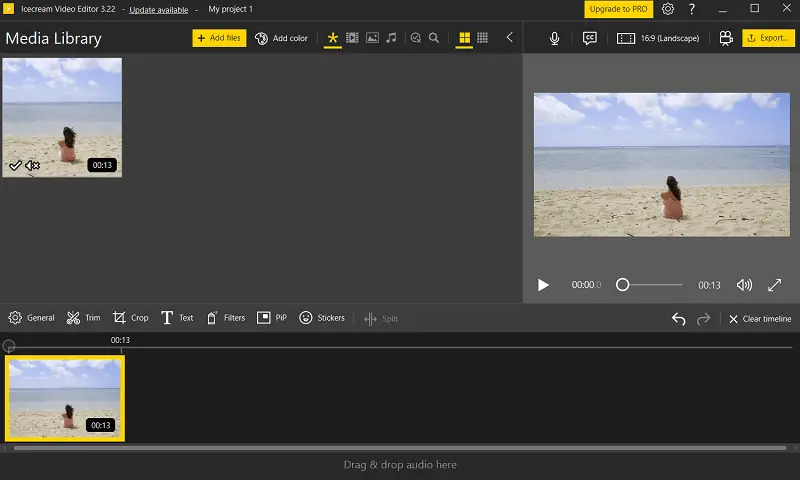
Its scene-oriented structure enables straightforward footage sequencing, ideal for producing clean, cohesive stories. Built-in flow presets such as zooms and pans introduce perceptual interest without requiring complex animation instruments.
The movie editor’s text engine grants detailed control over style, placement, and duration — well-suited for subtitles, labels, or intro screens.
| Tool | Description |
|---|---|
| Live Narration Capture | Allocates direct voice recording aligned with the pictorial strip. |
| Ratio Settings | Quick adjustment of video dimensions and orientation to suit various display standards. |
| Playback Speed Adjuster | Modifies tempo to introduce slow-motion or fast-forward modifications. |
| Effects Gallery | Includes a variety of cinematic transitions for smooth, visually appealing shot changes. |
| Enhancement Filters | Preset-based color and lighting adjustments for fast mood or style alteration. |
| Precision Cutting | Empowers selective removal or isolation of segments for tighter edits and refined pacing. |
| Audio Track Embedder | Integrates music and background sound with basic volume control and fade-in/out options. |
| PiP Composer | Supports layering assorted sources in one exposure, ideal for tutorials, commentary, or split-angle views. |
| Sticker Overlays | Adds decorative icons, labels, or themed images to personalize successions. |
Icecream Video Editor delivers an effective blend of accessibility and functionality, making it a reliable choice for those seeking a straightforward yet versatile platform.
Whether crafting personal projects or preparing polished media for wider distribution, this video making software provides a practical environment that adapts well to diverse content styles and production goals.
Option 2. Adobe Premiere Pro
Adobe Premiere Pro confers a sophisticated nonlinear transformation interface featuring a multi-layer time ruler with support for nested sequences and dynamic trimming, allowing filmmakers to achieve accurate adjustments.
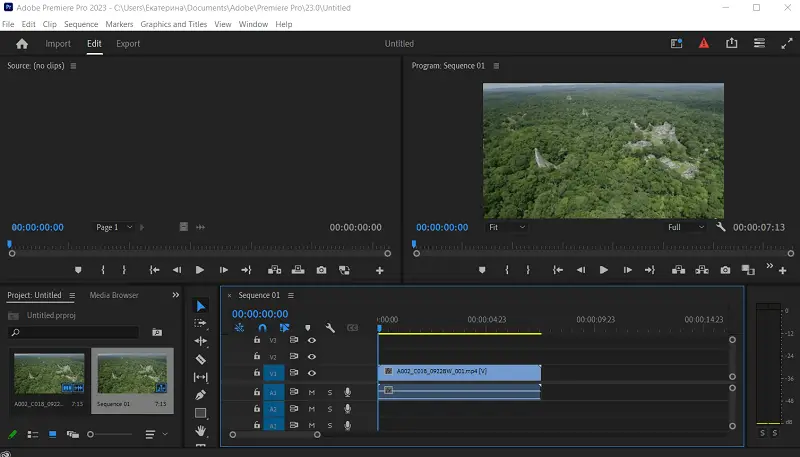
Desktop video editor's Mercury Playback Engine utilizes GPU acceleration to deliver fluid presentation and rapid rendering, even when working with intricate animations and high-resolution footage, including native handling of formats like RED, ARRI, and ProRes RAW.
| Tool | Description |
|---|---|
| Dynamic Link | Enables seamless connection to Adobe After Effects for instant updates without exporting intermediary files. |
| Lumetri Color Panel | Offers professional tone correction and grading features: curves, wheels, and hue/saturation controls. |
| Essential Sound Panel | Facilitates straightforward audio mixing by categorizing channel types and applying enhancements. |
| Adobe Audition Round-trip | Authorizes advanced stream editing and noise cleanup through direct sequence integration. |
| Team Projects | Cloud-based platform for real-time collaboration with automatic version tracking among several editors. |
| Auto Reframe | AI-powered functionality that adjusts shot composition automatically to fit various aspect ratios. |
| Scene Detection | Employs machine learning to identify edit points, accelerating the cutting process. |
Adobe Premiere Pro remains a good film editing software due to its continuous innovation and adaptability to evolving industry standards.
Its ability to endorse diverse workflows and handle complex assignments with ease makes it a reliable instrument for creators aiming to push creative boundaries.
Option 3. Lightworks
Lightworks delivers a timeline-focused modification environment built for accuracy and rapid work cycle, featuring real-time trimming alongside multi-camera support for intricate series.
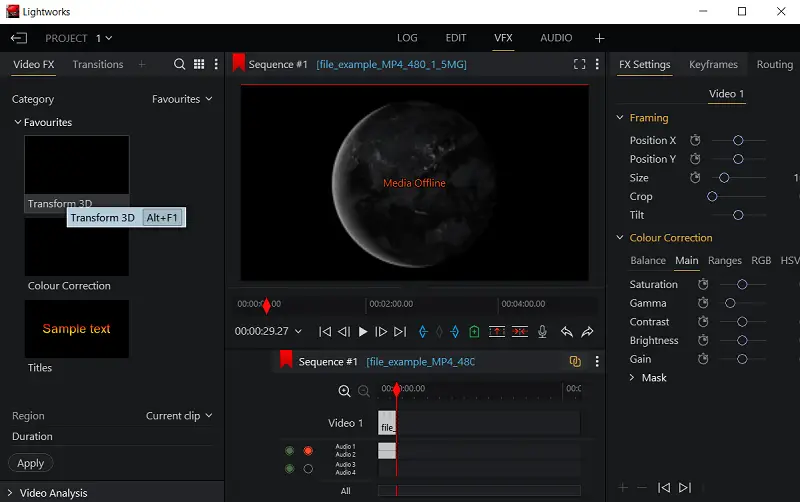
This desktop video editor accommodates a wide array of media types and quality up to 4K, ensuring seamless processing of high-definition content without conversion.
| Tool | Description |
|---|---|
| Color Correction | Customizable scopes and integration of LUTs for precise tuning. |
| Audio Console | Layered melody editing with live effect application and parameter automation. |
| Export Presets | Output configurations tailored for diverse platforms, including instant publishing to streaming services. |
| Plugin Framework | Extensible design permitting third-party add-ons to boost capabilities. |
| Proxy Editing | Routine optimization by building lower-resolution copies for less powerful hardware. |
| Metadata Tools | Clip tagging and categorization features to simplify asset organization and retrieval. |
| Mixed-format | Ability to combine numerous codecs, FPS, and sharpness within one project without conversion. |
Lightworks brings a robust and versatile solution ideal for experienced professionals as well as those aspiring to achieve high-quality results.
Video editing app's combination of speed, customization, and teamwork options accommodates various production demands. With ongoing advancements and broad compatibility, it helps users preserve artistic vision while streamlining their post-production workflow.
Option 4. VSDC Video Editor
VSDC Video Editor introduces a node-based structure that replaces traditional timelines with a more flexible system for arranging visual and audio components.
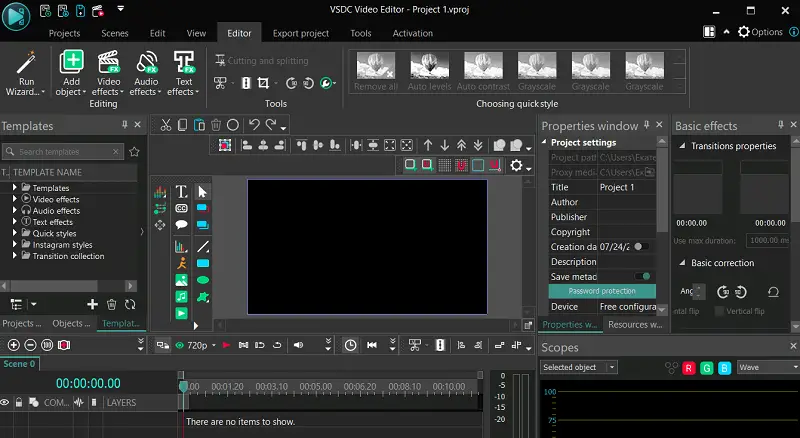
Foreground separation is managed through adjustable chrominance extraction, offering elaborated detail retention in compositing workflows. For acoustic alignment, the platform utilizes frequency mapping, allowing nuanced timing between acoustic layers and imagery.
| Tool | Description |
|---|---|
| Color Keying Module | Grabs specific hues to isolate subjects and replace backgrounds with refined edge smoothing capabilities. |
| Spectrum Analyzer | Examines tone frequencies for precise alignment and layering of elements. |
| Grading Suite | Provides advanced instruments to manipulate shades, brightness, and contrast through multidimensional controls. |
| Stabilization Tool | Minimizes camera shake by recalculating frame-to-frame motion, enhancing stability. |
| Data Visualization | Transforms numeric data into animated graphics, perfect for informational or instructional media. |
| Masking Tools | Permits targeted concealment or exposure of regions for inventive or corrective purposes. |
| Effects Collection | Contains a variety of adjustable filters to enrich aesthetics. |
| 3D Element Support | Integrates three-dimensional assets, allowing spatial manipulation and progression within compositions. |
Movie editing software's comprehensive functionality fosters innovation while maintaining efficiency, making it suitable for a spectrum of creative endeavors.
This solution enables seamless execution of complex narratives and compelling projects, ensuring high-quality output tailored to professional standards.
Option 5. Filmora
Filmora features an accessible interface paired with advanced object tracking that precisely anchors enhancements to moving elements.
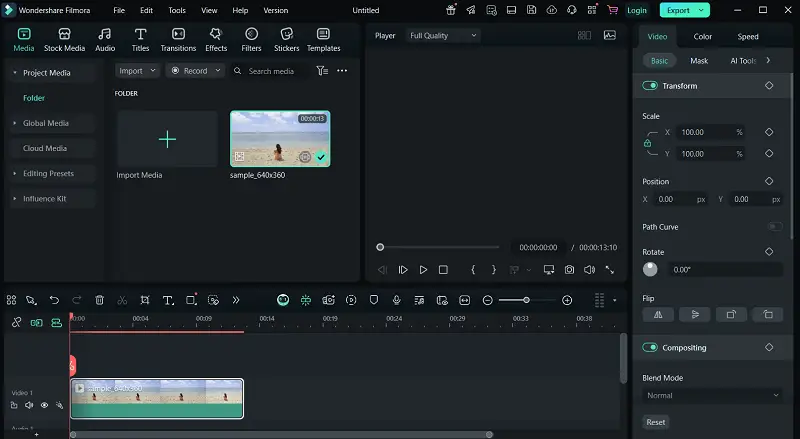
Simple video editor's wide range of modifiable overlays and transition styles adds depth to storytelling. Utilizing AI-based scene segmentation, the program streamlines footage breakdown for efficient transformation.
| Tool | Description |
|---|---|
| AI Human Recognition | Detects and isolates people automatically, enabling backing swaps without requiring chroma setups. |
| Audio Level | Reduces ambient sound when speech or key song events occur. |
| Background Replacement | Employs color filtering to eliminate backdrops with fine edge smoothing for natural composite shots. |
| Variable Speed Control | Modifies tempo on-the-fly to produce stylized slow-motion or accelerated sequences. |
| Typography Suite | Offers customizable animated text and graphic title options to enrich graphic narratives. |
| Tone Harmonizer | Ensures uniform grading across disparate cinematic captures for a cohesive look. |
| Frequency Tuner | Adjusts track ranges with precision to improve or shape the sonic environment. |
| Softening Effect | Applies blur to rapidly moving visuals to create fluid transitions. |
Filmora emerges as a versatile video editor for PC combining ease of use with robust capabilities. Its fusion of intelligent automation and precise customization enables creators to deliver refined, captivating material with efficiency.
Option 6. PowerDirector
PowerDirector offers an extensive array of features powered by advanced AI that simplifies complex tasks like accurate element identification and seamless backdrop modification.
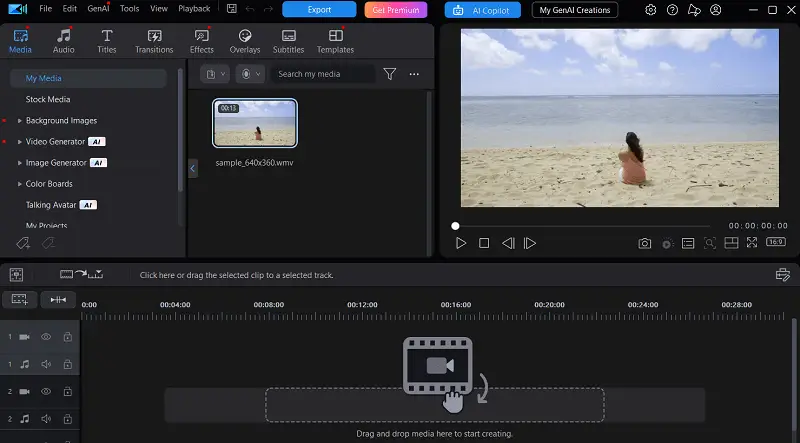
This video production software's capacity to handle multiple capture feeds simultaneously allows for sleek angle shifts, adding richness to the film. The platform employs high-level tracking techniques to follow various targets at once, supporting intricate effect integration.
| Tool | Description |
|---|---|
| Stabilization Module | Applies sophisticated corrections to minimize recorder shake. |
| Chroma Composer | Facilitates precise removal of backgrounds with glossy edge transitions. |
| Action Cam Suite | Specialized utilities designed to optimize footage from sport and adventure cameras, including distortion fixes. |
| Automated Leveling | Dynamically reduces ambient sounds during speech or crucial audio moments. |
| Keyframe Controller | Grants meticulous adjustment over animation progress and timing via modifiable control points. |
| Collage Creator | Merges multiple clips into stylish arrangements, featuring flexible shapes. |
PowerDirector excels by combining advanced options with intuitive operation, meeting the needs of content makers who prioritize speed and artistic expression.
Movie editor's resilient instruments accommodate a wide variety of challenges, from simple cuts to versatility. Regular enhancements and attention to optimization ensure it stays relevant and effective.
Option 7. Shotcut
Shotcut offers a powerful open-source program for those seeking extensive format compatibility and high customization. The platform’s non-linear timeline accommodates limitless layers, promoting complex compositions without conversions.
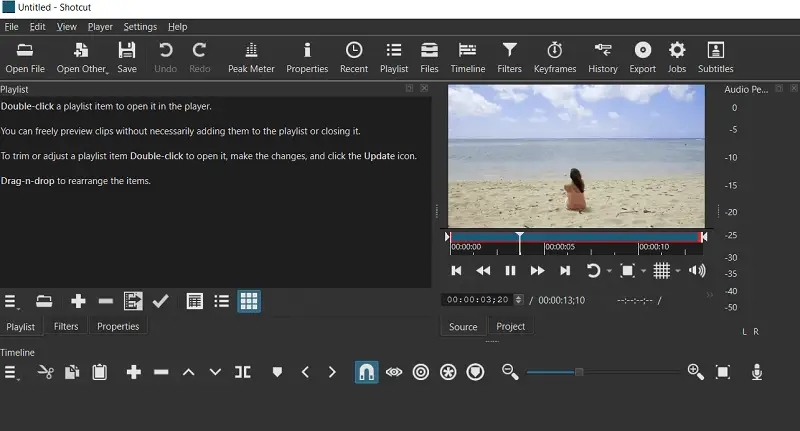
Free video editor's detachable and resizable panels offer a tailored workspace adaptable to diverse styles. Integration with hardware acceleration ensures fluid playback and responsive navigation through demanding extensions.
| Tool | Description |
|---|---|
| Color Scopes | Provides waveform monitors, vectorscopes, and histograms to assist with precise evaluation and correction. |
| Filter Library | Supplies a vast assortment of adaptable effects and transition options for creative enhancement. |
| Video Scaler | Dynamically adjusts resolution and aspect ratio to accommodate diverse requirements. |
| 3-Way Grading | Enhances image through separate adjustments of shadows, midtones, and highlights. |
| Stabilizer | Minimizes camera shake by analyzing motion and compensating during streaming. |
| Clipboard History | Keeps track of copied elements and edits for quick reuse. |
| Batch Export | Enables concurrent rendering of multiple sequences to streamline output processes. |
Shotcut shines by offering an open-code framework combined with a customizable setup.
Encouraging community involvement and continuous development, it stays a versatile solution that adapts to the evolving demands of contemporary filmmakers.
Option 8. VideoPad
VideoPad presents an accessible professional software for video editing focused on efficient project creation and smooth navigation. Its broad compatibility spans a wide spectrum of media formats, allowing seamless import without the need for transcoding.
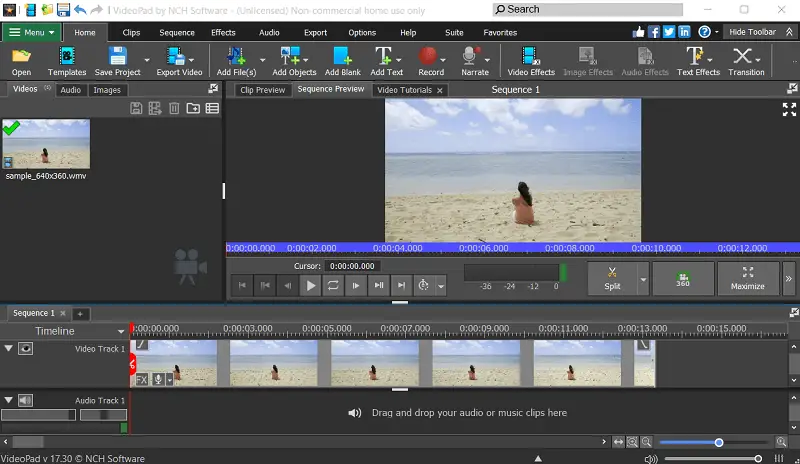
Output flexibility is notable, with optimized export presets for various devices, social media platforms, and streaming services, ensuring content is readily shareable across multiple channels.
| Tool | Description |
|---|---|
| Playlist | Collection area for storing clips ready to be used within the work. |
| Text Tool | Insert and customize elements such as titles, subtitles, and captions. |
| Chroma Key | Remove a specific background for compositing footage, often utilized for green screen effects. |
| Split/Join | Divide a movie into segments or merge multiple ones into continuous file. |
| Scrubbing | Navigate frame-by-frame through footage for precise editing points. |
| Rotate and Scale | Adjust the angle, size, and position of films within the preview window. |
| Audio Filters | Enhance sound with effects such as noise reduction, equalization, and compression. |
Shotcut provides a comprehensive array of unique features designed to suit users of varying skill levels.
From basic edits to intricate compositions, video making software's resources facilitate a smooth and effective production experience from start to finish.
How to choose a professional video editing software?
1. Goals and Content Type
Identify the style and complexity of clips you intend to produce — ranging from simple ones for social platforms to full-length films or promotional content. Different applications excel in distinct areas.
2. User-Friendliness vs. Advanced Tools
Some utilities prioritize an intuitive layout suitable for newcomers, while others offer robust functionalities made for seasoned producers.
3. Platform Compatibility
Confirm the movie editing software handles your preferred media formats and operates smoothly on your OS, whether it’s Windows, macOS, or Linux.
4. Features and Effects
Look for capabilities like multi-layer modifications, color correction, motion graphics, visual enhancements, and sound processing that align with creative ambitions.
5. Hardware Requirements
Make sure your device meets the technical specifications necessary for smooth operation, especially when working with high-definition or resource-intensive projects.
6. Licensing Terms
Review payment options such as one-off purchases, subscriptions, or free free video editors, and weigh them against your budget and intended usage.
7. Customer Assistance
Access to video tutorials, community forums, and responsive support can greatly simplify the learning curve and resolve issues quickly.
By examining these factors thoroughly, you can select a service that best suits vision, technical skills, and financial considerations.
Conclusion
In the rapidly changing world of digital media, professional video editing applications are essential for turning unprocessed clips into captivating narratives.
Ultimately, staying informed about the latest software advancements and understanding the strengths of various platforms empowers individuals to select the most effective resources, ensuring their storytelling remains impactful.
Expert Tech Writer
